Flexible IPTV Streaming with M3U & Xtream Codes Support
Trex IPTV is a subscription-based streaming solution designed for viewers who want to access available live and on-demand programming through IPTV-compatible devices and applications. With support for common IPTV connection formats, the service can be configured across a variety of home and mobile streaming setups.
Subscribers can use compatible M3U playlists or Xtream Codes credentials with supported IPTV players. This makes it possible to choose the application and device that best fits your viewing setup instead of being limited to a single type of player.
Flexible IPTV Streaming with M3U & Xtream Codes Support
Trex IPTV is built around widely supported IPTV formats, making installation possible on many popular streaming platforms. Depending on your device and preferred application, account credentials can be added to a compatible player to organize and access the programming available with your subscription.
Compatible equipment and platforms may include Android-based streaming boxes, Amazon Fire TV devices, Smart TVs, Apple TV, MAG boxes, Formuler receivers, BuzzTV devices, NVIDIA Shield, Chromecast-compatible equipment, and other supported systems.
The service can also be configured with compatible IPTV applications such as TiviMate, IPTV Smarters, IMPlayer, STB emulators, and other players that accept supported M3U or Xtream Codes account information.
What You Can Access with Trex IPTV
Available programming can vary by subscription, region, availability, and service updates. Depending on the package selected, the platform may provide access to a combination of live and on-demand categories.
- Live Television – Browse available live programming through an organized IPTV interface.
- International Programming – Explore available content from a variety of regions and languages.
- Sports Categories – Access available sports-related programming included with the selected package.
- Video on Demand – Browse available movies and other on-demand programming from supported categories.
- TV & Series Categories – Explore episodic and series-based content available through the service.
- Family Programming – Find available entertainment categories intended for different members of the household.
Channel lineups, programming, video quality, and availability can change and should not be considered permanently guaranteed.
Key Trex IPTV Service Features
- Support for compatible M3U playlist connections.
- Support for Xtream Codes-compatible IPTV players.
- Usable across a variety of supported streaming devices.
- Live and on-demand viewing categories where included.
- HD and higher-resolution streams where the source, device, connection, and selected content support them.
- Account information provided for configuration with a compatible IPTV application.
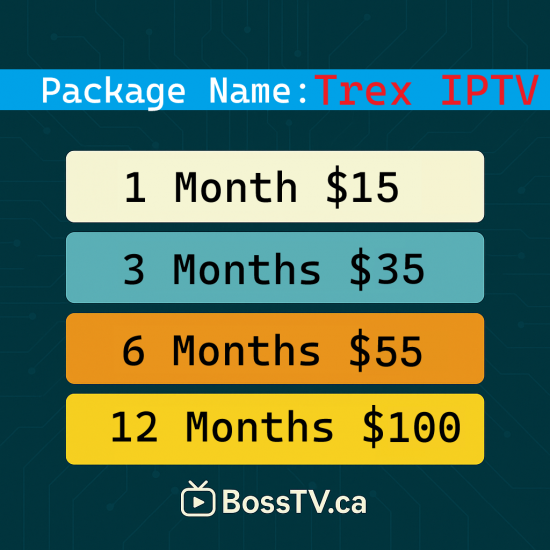
- Multiple subscription durations may be available.
Watch on Your Preferred IPTV Device
One advantage of Trex IPTV is its compatibility with different types of streaming hardware. Rather than requiring one dedicated device, subscribers can configure the service on many commonly used IPTV platforms.
Your viewing experience will depend on the device, IPTV application, internet connection, network conditions, and the quality of the available source stream. For the best experience, use an up-to-date compatible player and a stable internet connection.
Getting Started with Trex IPTV
- Select the subscription option appropriate for your intended setup.
- Complete the order and provide any information required for activation.
- Receive the account credentials or playlist information associated with the subscription.
- Install a compatible IPTV application on your streaming device.
- Add the provided account information to the application.
- Allow the player to load the available categories and begin using the service.
IPTV Setup Assistance
Setting up an IPTV service can differ from one device to another. Fire TV, Android TV, Smart TV, MAG, Formuler, BuzzTV, Apple TV, and other platforms can each use different applications and configuration methods.
If you are unsure which setup method applies to your device, assistance can be provided for configuring compatible account credentials with an appropriate IPTV player.
Trex IPTV Subscription Information
Before ordering, confirm that your preferred device and IPTV application support the connection method provided with your subscription. Programming availability and streaming quality may vary over time and can be affected by factors outside the user's device, including network conditions and source availability.
Trex IPTV provides a flexible way to use supported IPTV technology across compatible streaming devices. With M3U and Xtream Codes compatibility, subscribers can configure their service using a supported player and access the pr
- Stock: 10000
- Model: Server Name: Trex IPTV / Xtream Code M3u
- Worldwide Sports: All Boxes
- PPV Channels: All Boxes