
Top IPTV Apps 2027 – Find the Best IPTV Player for Your Device
Choosing the best IPTV app in 2027 isn't simply about downloading the most popular player. The right application depends on your streaming device, the type of IPTV subscription you have, and the features you actually use.
Some IPTV players are designed for Android TV and Amazon Firestick, while others work better on Samsung Smart TVs, LG televisions, Apple TV, or mobile devices. Certain applications focus on live television, while others provide advanced program guides, playlist management, recording features, and Video-on-Demand navigation.
This guide compares 12 IPTV apps worth considering for 2027, explains their main differences, and helps you choose a player for Xtream Codes, M3U playlists, or Stalker Portal connections.
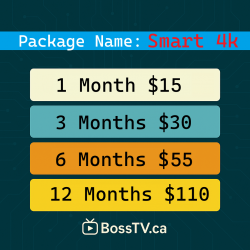
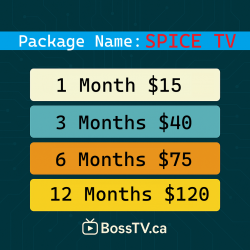
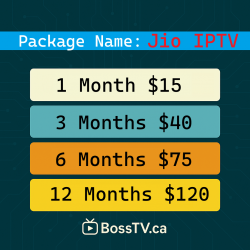
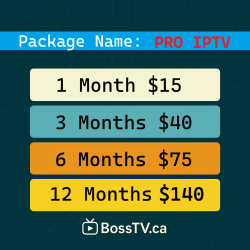
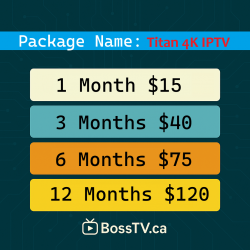
If you already have a compatible IPTV application but still need a television subscription, explore the IPTV subscription options available through BossTV.
Quick Comparison: Best IPTV Players for 2027
Before looking at individual applications, here's a quick comparison of popular IPTV players and their main strengths.
| IPTV App | Best Suited For | Main Strength |
|---|---|---|
| TiviMate | Android TV and Google TV | TV-style guide and customization |
| IPTV Smarters Pro | Compatible mobile and TV devices | Live TV and VOD organization |
| OTT Navigator | Android power users | Advanced filters and settings |
| XCIPTV Player | Android TV and Fire TV | Simple category-based interface |
| iMPlayer | Android TV enthusiasts | Playlist and guide management |
| Smart IPTV | Supported Smart TVs | Playlist-based television playback |
| SmartOne IPTV | Supported Samsung and LG TVs | Smart TV playlist management |
| Flix IPTV | Compatible Smart TVs | Organized playlist interface |
| Net IPTV | Supported Smart TVs | Simple playlist loading |
| SS IPTV | Compatible Smart TVs | Basic playlist playback |
| SmartSTB | Portal-based IPTV setups | Set-top-box-style interface |
| STBEmu | Android Stalker Portal users | MAG-style portal emulation |
Compatibility, app-store availability, pricing, and features can change. Always check the latest requirements for your specific device before installing an IPTV player.
1. TiviMate – Best for an Android TV Experience
TiviMate IPTV Player is a strong option for viewers who want their IPTV interface to resemble a traditional television guide.
Its remote-friendly design makes it particularly appealing on Android TV boxes, Google TV devices, and NVIDIA Shield.
Why Consider TiviMate?
- Electronic Program Guide navigation
- Support for compatible M3U and Xtream Codes playlists
- Customizable channel groups
- Favorites and viewing preferences
- Multiple playlist management
- Additional premium features on supported devices
Best suited for: Viewers using Android TV-based devices who want detailed control over their live television experience.
Keep in mind: TiviMate is primarily designed for Android TV-based platforms. It is not a universal application for Apple TV, Samsung Tizen, or LG webOS.
2. IPTV Smarters Pro – Best for a Familiar IPTV Dashboard
IPTV Smarters Pro is widely recognized for its category-based layout and support for common IPTV account formats.
Its interface commonly separates live television, movies, and series into different sections, making it approachable for users who prefer straightforward navigation.
Notable Features
- Live TV category navigation
- Movies and television series sections
- Xtream Codes-compatible login options
- M3U playlist support on compatible versions
- Electronic Program Guide support
- Favorites and playback controls
Best suited for: Users who want an organized IPTV dashboard with separate areas for live channels and on-demand content.
Keep in mind: Different applications use similar Smarters branding. Confirm the publisher, platform compatibility, and legitimacy of the version you install.
3. OTT Navigator – Best for Advanced IPTV Customization
OTT Navigator is worth considering if you prefer customizing how your television channels and playlists appear.
Rather than focusing only on a simple home screen, it offers a variety of settings for viewers who want more control over their IPTV experience.
Notable Features
- Channel filtering and grouping
- Customizable viewing layouts
- Playlist organization
- EPG integration where supported
- Playback preferences
- Advanced navigation settings
Best suited for: Experienced Android IPTV users who enjoy personalizing their player.
Keep in mind: The number of settings may feel overwhelming if you only want a basic television interface.
4. XCIPTV Player – Best for Simple Live TV and VOD Navigation
XCIPTV Player is known for an interface that separates television channels, movies, and series into recognizable categories.
It is commonly associated with Android-based streaming environments and IPTV services that use compatible account formats.
Notable Features
- Live TV sections
- Movies and series categories
- EPG support
- Favorites management
- Built-in playback options
- Remote-control-friendly navigation
Best suited for: Viewers who want a straightforward IPTV application without extensive customization.
Keep in mind: XCIPTV branding is also used in customized provider applications, so features and login methods can differ between versions.
5. iMPlayer – Best for IPTV Enthusiasts
iMPlayer is another IPTV application aimed at Android TV users who want playlist management and television-guide functionality.
It offers an alternative to basic IPTV players, particularly for households using dedicated Android TV streaming equipment.
Notable Features
- Live television guide navigation
- Compatible playlist management
- Channel favorites
- Customizable viewing options
- Additional features depending on the app version
Best suited for: Android TV viewers who want an alternative to TiviMate.
Keep in mind: Some advanced features may require a paid version or additional setup.
6. Smart IPTV – Best for Playlist-Based Smart TV Viewing
Smart IPTV, sometimes called SIPTV, is a playlist-based application associated with compatible Smart TV platforms.
Instead of providing television channels itself, the application allows users to load supported playlists from their own content source.
Notable Features
- M3U playlist playback
- Television remote navigation
- Playlist management
- Simple channel selection
- Compatibility with certain Smart TV models
Best suited for: Smart TV owners who prefer a playlist-based IPTV application.
Keep in mind: Availability differs by television model, operating system, region, and app store. Activation charges may apply.
7. SmartOne IPTV – Best for Supported Samsung and LG TVs
SmartOne IPTV is designed for supported Smart TV environments and offers a way to manage compatible IPTV playlists without necessarily requiring a separate Android streaming box.
Notable Features
- Playlist-based IPTV access
- Smart TV remote navigation
- Channel organization
- Playlist management tools
- Support for compatible television models
Best suited for: Viewers who want to use an IPTV application directly on a supported Samsung or LG television.
Keep in mind: Check your exact television model and the application's current activation terms before purchasing.
8. Flix IPTV – Best for a Clean Playlist Interface
Flix IPTV is a playlist-oriented IPTV player that emphasizes television navigation and content organization.
It may appeal to viewers who prefer a relatively simple interface rather than an application with numerous technical settings.
Notable Features
- Compatible playlist playback
- Channel category organization
- Playback controls
- Subtitle and audio options where supported
- Smart TV-oriented navigation
Best suited for: Viewers looking for a straightforward playlist player on a supported device.
Keep in mind: App availability and licensing can change. Verify that the version offered for your device is currently supported.
9. Net IPTV – Best for Basic Playlist Management
Net IPTV is another option for users who prefer loading a compatible IPTV playlist into a television application.
Its appeal is primarily in straightforward playlist access rather than extensive customization.
Notable Features
- Compatible playlist loading
- Channel list navigation
- Remote-control operation
- Playlist management
- Support for selected Smart TV environments
Best suited for: Viewers who want a simple IPTV playlist interface on a compatible television.
Keep in mind: Device support and activation requirements should be checked before installation.
10. SS IPTV – Best for Basic Smart TV Playlist Playback
SS IPTV is a playlist-based application associated with supported Smart TV platforms.
It can be useful for viewers who already have a compatible playlist and want a basic way to organize and access television channels.
Notable Features
- Playlist management
- Support for compatible streaming sources
- Channel list navigation
- Smart TV remote operation
- Basic IPTV playback features
Best suited for: Users who prefer a straightforward Smart TV IPTV player.
Keep in mind: SS IPTV availability is not universal across Samsung, LG, and Android TV devices. Confirm support for your model.
11. SmartSTB – Best for a Set-Top-Box-Style Interface
SmartSTB takes a different approach from ordinary M3U playlist players. It is intended to provide a set-top-box-style IPTV interface for compatible portal-based services.
This makes it relevant for viewers who use IPTV subscriptions built around supported portal systems.
Notable Features
- Set-top-box-style navigation
- Compatible portal configuration
- Remote-control-oriented interface
- Channel and program guide navigation
- Support for selected television platforms
Best suited for: Users who need a compatible portal-based IPTV application rather than a conventional playlist player.
Keep in mind: SmartSTB is not interchangeable with every Xtream Codes or M3U player. Portal compatibility and activation requirements must be confirmed.
12. STBEmu – Best for Stalker Portal and MAC-Based IPTV
STBEmu is designed to emulate aspects of a MAG-style set-top-box environment on compatible Android devices.
Unlike ordinary Xtream Codes players, STBEmu is primarily associated with IPTV services that use Stalker Portal and MAC Address-based activation.
Notable Features
- Stalker Portal configuration
- MAG-style interface emulation
- Virtual MAC Address settings
- Portal-based channel navigation
- Compatibility with supported Android devices
Best suited for: Android users whose IPTV subscription specifically requires a Stalker Portal connection.
Keep in mind: STBEmu does not turn an ordinary Xtream Codes account into a Stalker Portal subscription. Your provider must support the required activation method.
Which IPTV App Should You Choose in 2027?
There is no single IPTV player that is ideal for every streaming device and subscription format.
Here are practical starting points:
- Android TV and Google TV: Consider TiviMate, OTT Navigator, XCIPTV, or iMPlayer.
- Amazon Firestick: Look for a compatible Android-based IPTV player designed to work with Fire TV controls.
- Samsung Smart TV: Check Smart IPTV, SmartOne IPTV, or other apps supported by your specific television.
- LG Smart TV: Look for an IPTV application currently available for your webOS model.
- Apple TV: Choose a dedicated tvOS IPTV player that supports your subscription format.
- Xtream Codes accounts: Select an application with an explicit Xtream Codes login option.
- M3U playlists: Choose a player supporting M3U URLs or playlist files.
- Stalker Portal accounts: Consider a compatible portal-capable application such as STBEmu or SmartSTB.
Always confirm application compatibility with both your streaming device and IPTV subscription before paying for premium features.
IPTV Apps vs. IPTV Subscriptions: What's the Difference?
One of the most common misunderstandings among new IPTV users is the difference between an IPTV player and an IPTV subscription.
IPTV Player
An IPTV player is the application used to load, organize, and play supported television streams. Examples include TiviMate, IPTV Smarters, and XCIPTV.
IPTV Subscription
An IPTV subscription provides access to the channels and content offered by a particular service. Depending on the provider, account details may be supplied through Xtream Codes, M3U, or Stalker Portal activation.
Installing an IPTV application does not automatically give you access to premium television channels.
If you already have a player and are comparing available television packages, visit BossTV to explore premium IPTV server options and compatible subscription formats.
How to Choose an IPTV Player Based on Login Method
Before installing an IPTV app, identify the type of account supplied with your subscription.
Xtream Codes Login
Xtream Codes-compatible accounts generally use a server URL, username, and password.
Look for an application with an explicit Xtream Codes login option.
M3U Playlist
M3U accounts use a compatible playlist URL or file.
Choose an IPTV player that supports playlist import and any required program guide format.
Stalker Portal
Stalker Portal services commonly use a portal URL and MAC Address registration.
These subscriptions require compatible portal-based devices or applications. Not every IPTV player supports this connection method.
Free vs. Paid IPTV Players
Many IPTV applications offer basic playback functionality, while others charge for activation, premium features, or additional device support.
Free or basic versions may be suitable for viewers who only need simple channel playback.
Paid features may include:
- Multiple playlist management
- Advanced Electronic Program Guide settings
- Additional customization
- Recording features on supported devices
- More detailed channel organization
- Expanded playback controls
Paying for an IPTV player does not necessarily include an IPTV subscription or additional television channels.
Common IPTV App Problems and How to Troubleshoot Them
Even a well-designed IPTV player may encounter problems if the account details, network connection, or playlist are not working correctly.
Channels Won't Load
Check your internet connection, confirm the account details, and verify that your subscription is active.
EPG Is Missing
Refresh the program guide and confirm that your service provides a compatible EPG source.
Video Buffers Frequently
Test your connection, try Ethernet if supported, and check whether the issue affects all channels or only selected streams.
App Crashes or Freezes
Restart the application, check for updates, and confirm that your device has enough available memory and storage.
Login Is Rejected
Confirm that you're using the correct login method. Xtream Codes credentials cannot automatically be used as Stalker Portal credentials.
Frequently Asked Questions About IPTV Apps in 2027
What is the best IPTV app for 2027?
The best IPTV app depends on your device and subscription format. TiviMate is worth considering for Android TV, while IPTV Smarters and XCIPTV may suit users who prefer category-based interfaces.
Which IPTV player is best for Firestick?
Firestick users should choose an IPTV player compatible with their Fire TV device and the account format provided by their subscription. Available options vary by model and software version.
Can I use IPTV Smarters on a Smart TV?
Certain Smarters applications are available for supported television platforms. Check the app store and compatibility requirements for your specific Smart TV.
Is TiviMate available on Apple TV?
TiviMate is primarily designed for Android TV-based devices. Apple TV users should look for an IPTV application developed for tvOS.
Do IPTV apps include free channels?
Most IPTV players are software applications rather than content providers. They generally require a compatible playlist, subscription, or authorized streaming source.
Can I use an M3U playlist in any IPTV app?
No. Some IPTV applications support M3U playlists, while others require Xtream Codes or portal-based connections.
What is the best IPTV app for Stalker Portal?
STBEmu and SmartSTB are options worth investigating for compatible portal-based IPTV subscriptions. Device and provider compatibility must be confirmed.
Do paid IPTV players improve streaming quality?
Paid applications may offer additional playback controls or features, but they cannot guarantee better video quality when the original stream or internet connection is limited.
Are IPTV player apps legal?
IPTV player software is not inherently illegal. The legality of accessing or distributing particular television streams depends on content rights, authorization, and applicable laws.
Final Verdict: Choosing the Best IPTV Apps for 2027
The top IPTV apps for 2027 offer different strengths. TiviMate emphasizes television-guide navigation, IPTV Smarters provides a familiar content dashboard, OTT Navigator focuses on customization, and portal-oriented applications such as STBEmu serve a different type of IPTV connection.
Rather than selecting an IPTV player based only on popularity, choose one that supports your device, account format, and preferred features.
Once you have a compatible IPTV application, compare available IPTV subscriptions through BossTV to find a service that matches your viewing needs.
Related Products